October 2026 Release
Screendragon now has a new left-hand navigation and a refreshed interface, built to get your teams to their work in fewer clicks. Everything you rely on today is still there; it is just easier to find, faster to reach, and more consistent from screen to screen.
At a glance, the update brings:
- A persistent left-hand navigation panel that keeps your main areas (Home, Projects, Tasks, Resources, Reports, Admin) one click away from anywhere in the platform.
- A cleaner, more modern visual design with clearer typography, more breathing room, and a consistent layout across modules.
- More space for your work, with a collapsible panel that gives the full screen back to plans, proofs, and dashboards when you need it.
Why we've updated
We redesigned navigation because the way our customers use Screendragon has grown, and the old top menu had not kept pace. Four things drove the change.
- Your platform has grown, and navigation needed to keep pace.Screendragon now covers briefing, projects, proofing, resourcing, finance, reporting, and AI capabilities. A horizontal menu runs out of room as modules are added; a vertical panel can hold more sections cleanly, with room to grow as new features arrive.
Navigation Before: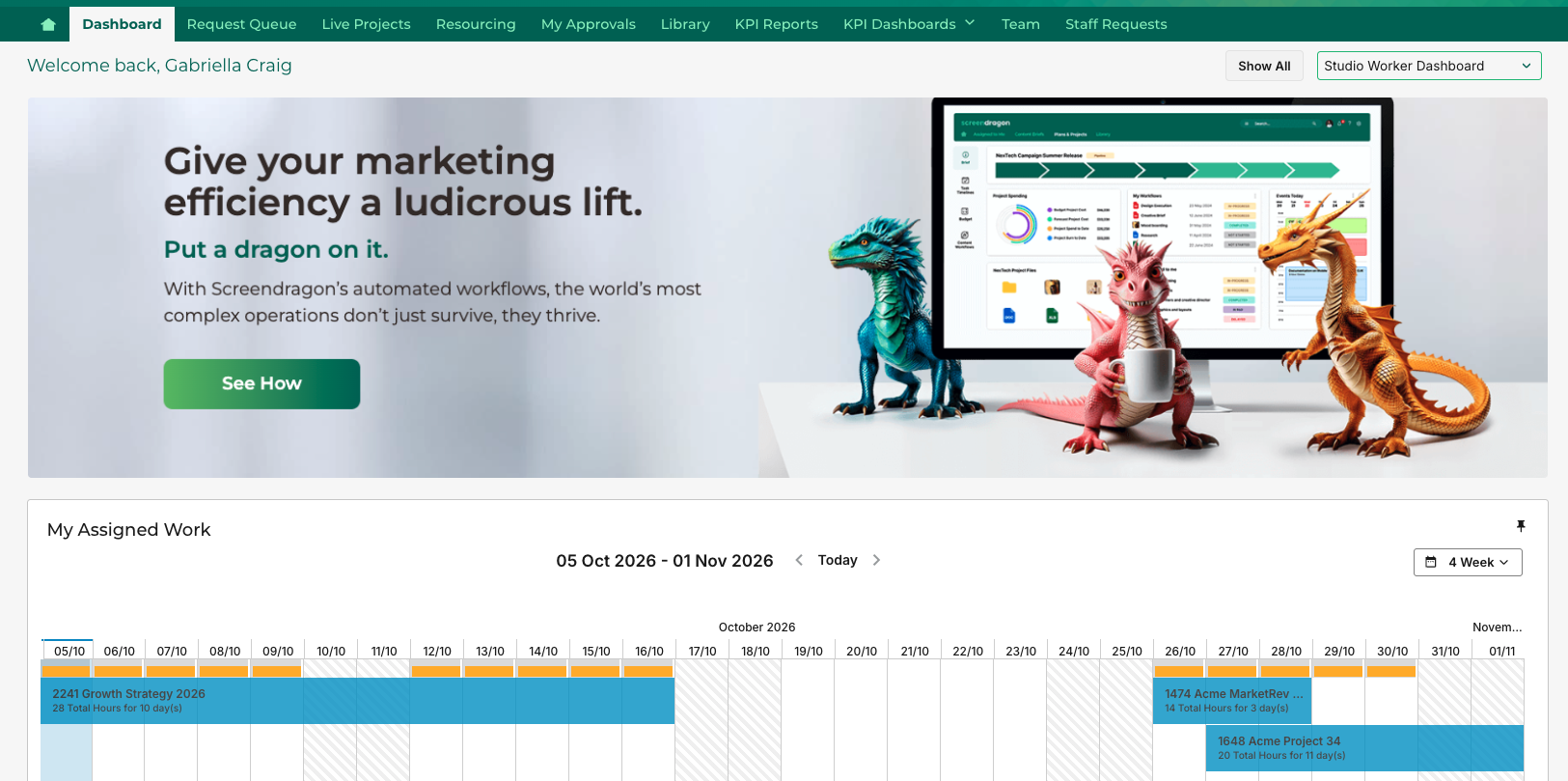
- It matches how people already work in modern software. Left-hand navigation is now the standard pattern across the business tools your teams use every day. Meeting that expectation means new users feel at home sooner and need less training.
Navigation Now: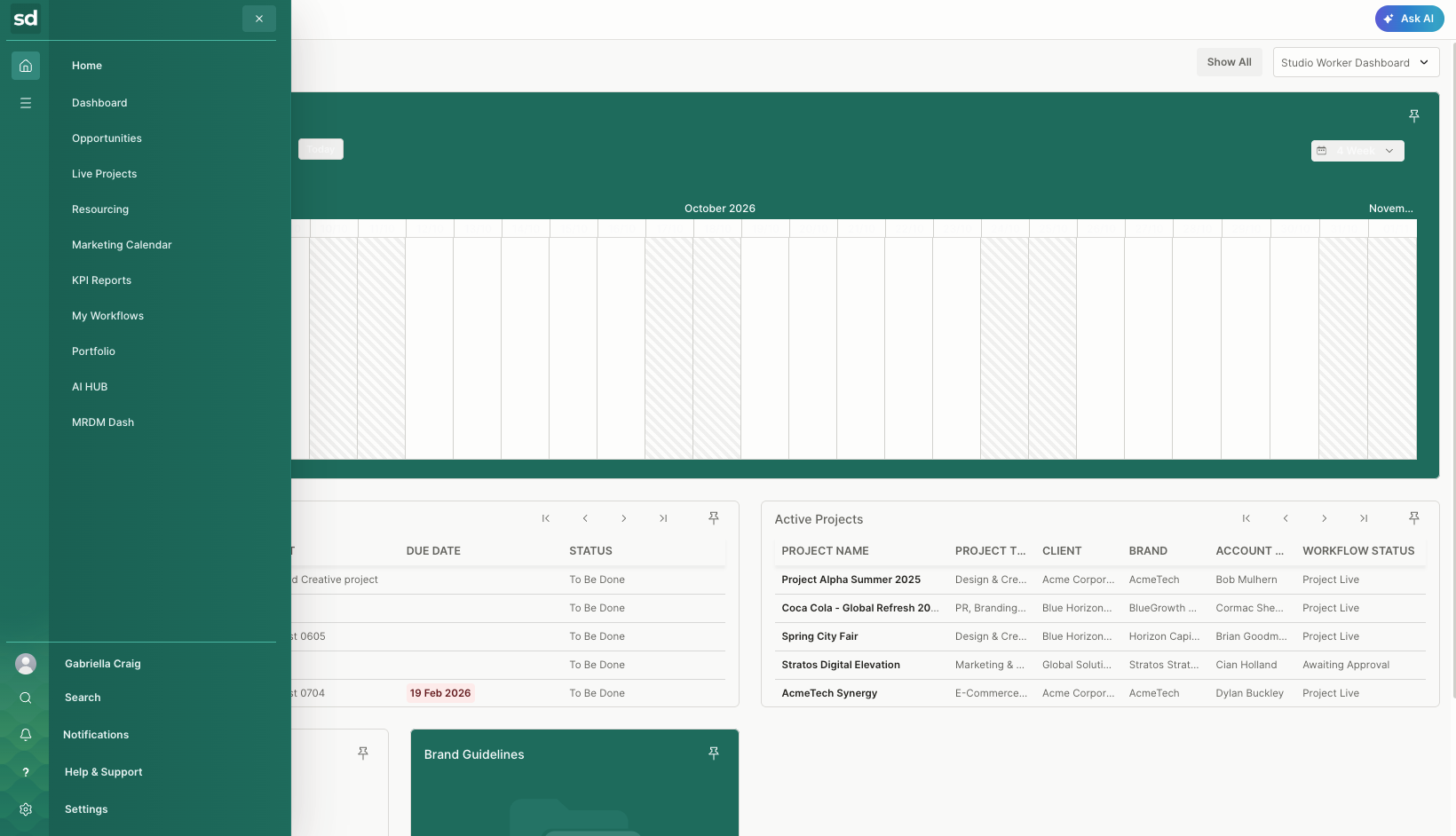
- Navigation took too long. Feedback consistently pointed to search, discoverability, and moving between areas as friction points. The new layout puts every main area in a single, predictable place.
- Widescreen monitors favor vertical navigation. Most screens are wider than they are tall. Moving navigation to the side frees vertical space for Gantt charts, Kanban boards, proofs, and dashboards, which is where your teams spend their time.
Key benefits for your teams
Switching gives every role a faster, calmer way to move through Screendragon.
Who | What they gain |
|---|---|
Everyday users | Fewer clicks to reach projects, tasks and approvals; the same navigation on every screen |
New starters | A familiar layout that shortens onboarding and reduces training time |
Project and resource managers | More screen space for plans, timelines and capacity views |
Approvers and stakeholders | A clearer route to items awaiting their review |
Administrators | Navigation that is easier to explain, support and roll out across the organization |
The refresh also improves accessibility, with stronger contrast, larger click targets and clearer focus states for keyboard users.
What else is new in the interface
Alongside navigation, the whole interface has a lighter, more modern look that keeps the focus on your content.
- Refreshed visual style. Updated typography, spacing, icons, and colors give every page a cleaner, less cluttered feel.
- Consistent page layouts. Headers, buttons, and actions sit in the same place across modules, so once you learn one screen, you know them all.
- Better on every screen size. Layouts adapt more smoothly from large monitors to laptops and tablets.
What stays the same
The new navigation changes how you get around, not what you have. Your setup carries over untouched:
- All projects, tasks, files, forms and historical data
- Workflows, approval routes and automations
- User roles, permissions and security settings
- Custom templates, dashboards, reports and integrations
FAQ and Support
Will my users need training? Very little. The layout follows patterns most people already know. A five-minute walkthrough of the panel is usually enough.
Will anything break? No. Your data, workflows, and permissions are unchanged; only the navigation is new.
Is there a cost to upgrade? No. Switching is included for all customers at no additional charge.
Who can help? Contact your Customer Success Manager or the Help Desk to plan your switch or book a demo.
Was this article helpful?
That’s Great!
Thank you for your feedback
Sorry! We couldn't be helpful
Thank you for your feedback
Feedback sent
We appreciate your effort and will try to fix the article